Playing with KVM/libvirt on RISC-V
I recently got my hands on a Milk-V Jupiter 2. It’s built around the SpacemiT K3, the first generally available RVA23-compliant CPU, which means it also supports the H-extension. That last part means hardware-assisted virtualization, so naturally the first thing I wanted to try was getting KVM and libvirt up and running on it.
Playing around with some distros
Before I could get to the fun part, I needed an operating system on the board
that would actually let me load the kvm kernel module. I tried Ubuntu,
Debian and Bianbu.
Both Ubuntu and Debian gave me a segmentation fault when loading the KVM module, at least at the time of writing. Bianbu, using the Bianbu minimal image, worked without any issues, so that’s what I ended up using for the host.
Installing libvirt-daemon
With a working host OS in place, installing libvirt is straightforward:
$ sudo apt-get update
$ sudo apt-get install libvirt-daemon
To make sure the kvm module gets loaded automatically on boot, I added a
/etc/modules-load.d/kvm.conf file with the following content:
kvm
Trying different distros as guest
For managing the VMs, I used virt-manager from my desktop rather than
virsh directly. Either works fine, but I’m simply more familiar with
virt-manager’s interface.
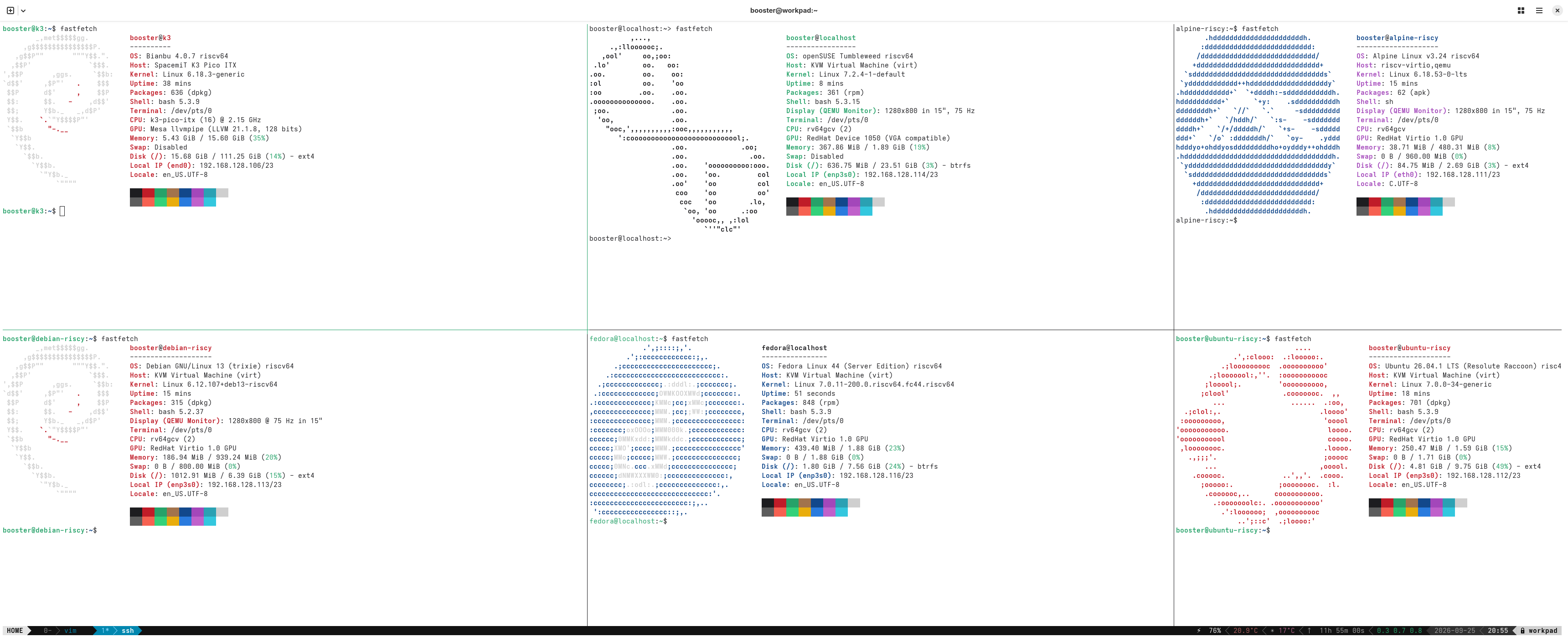
I tried a handful of guest distros: Ubuntu, Debian, Alpine, Fedora, openSUSE Tumbleweed and Arch Linux.
Ubuntu, Debian, Fedora and openSUSE Tumbleweed all worked without a hitch. The installer ISOs for both Arch Linux and openSUSE (the netboot one, see below) crashed on boot at the time of writing.
Fedora and openSUSE provide disk images with a default installation, while
Ubuntu, Debian and Alpine provide an installation ISO instead. Alpine had one
small caveat: I had to switch to the second tty (ctrl + alt + f2) to be able
to log in as root, seemingly some kind of tty issue with the first console.
Once I did that, the rest of the installation went fine.
For openSUSE, I first tried the netboot installer ISO, which crashed on boot for me. The qcow appliance image they provide worked fine, though. One thing that didn’t work was disk encryption during enrollment, so I just skipped that step.
Conclusion
Setting up KVM on Bianbu 4.0.7 on the Milk-V Jupiter 2 turned out to be very easy. Ubuntu and Debian had issues loading the KVM module, but that’s likely just a matter of time before it gets fixed upstream. Running the VMs off the UFS storage feels very fast, even when installing packages inside the guest.
What a way we’ve come since I got my first piece of physical RISC-V hardware, the MangoPi MQ-Pro, back in 2022. Despite some rough edges when running VMs with KVM, the overall experience is actually really pleasant. The performance of the machine itself is light-years ahead of the first commercially available RISC-V SBCs. Of course, it’s worth mentioning that the price difference is also very high.
References
Host images:
Guest images: